
USERS
The Users menu is the central place where the admin manages all members of the platform. It acts as the control center for user-related activities, permissions, and financial tracking.
Through this section, the admin can monitor user activity, manage account status, and control earning capabilities. It helps in ensuring that only valid and active users are participating in cashback, referral, and reward programs. If any suspicious activity is detected, the admin can take immediate action such as restricting or disabling the account.
This menu also plays a major role in financial supervision. It allows the admin to track how much users are earning, how much is payable, and how much has already been paid. This ensures transparency and proper pay out management.
In short, the Users menu is responsible for user account management, earnings control, referral permissions, monitoring financial data, and maintaining platform security. It helps the admin maintain smooth operations and trust within the cashback ecosystem.
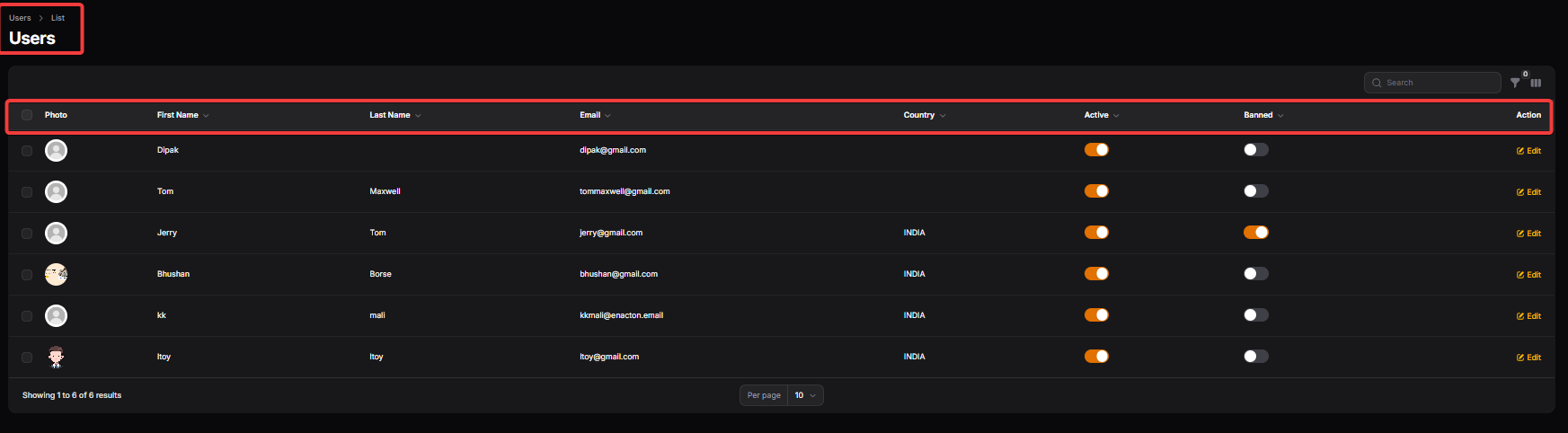
First Name / Last Name: The user’s personal name used for identification and communication.
Email :The primary login ID of the user. All important notifications and account-related communication are sent to this email.
Banned :If enabled, the user is restricted from accessing the platform. This is used to control suspicious, inactive, or policy-violating account.
USER DETAILS CAN BE EDITED:
USER INFORMATION:
First Name / Last Name: The user’s personal name used for identification and communication.
Email :The primary login ID of the user. All important notifications and account-related communication are sent to this email.
Banned :If enabled, the user is restricted from accessing the platform. This is used to control suspicious, inactive, or policy-violating account.
ADDITIONAL INFORMATION:
Country: Indicates the user’s country of residence. Important for currency handling, compliance, and region-based campaigns.
Referred By: Indicates which existing user referred this member to the platform
Referral Code: A unique code assigned to the user to invite others and earn referral commission.
Referrer Code: The referral code that this user applied during registration.
Referral Percent: The percentage commission the user earns from their referrals’ eligible transactions.
Lang: The preferred language selected by the user for platform communication.
Email Verified At: The date and time when the user’s email was verified.
USER EARNINGS
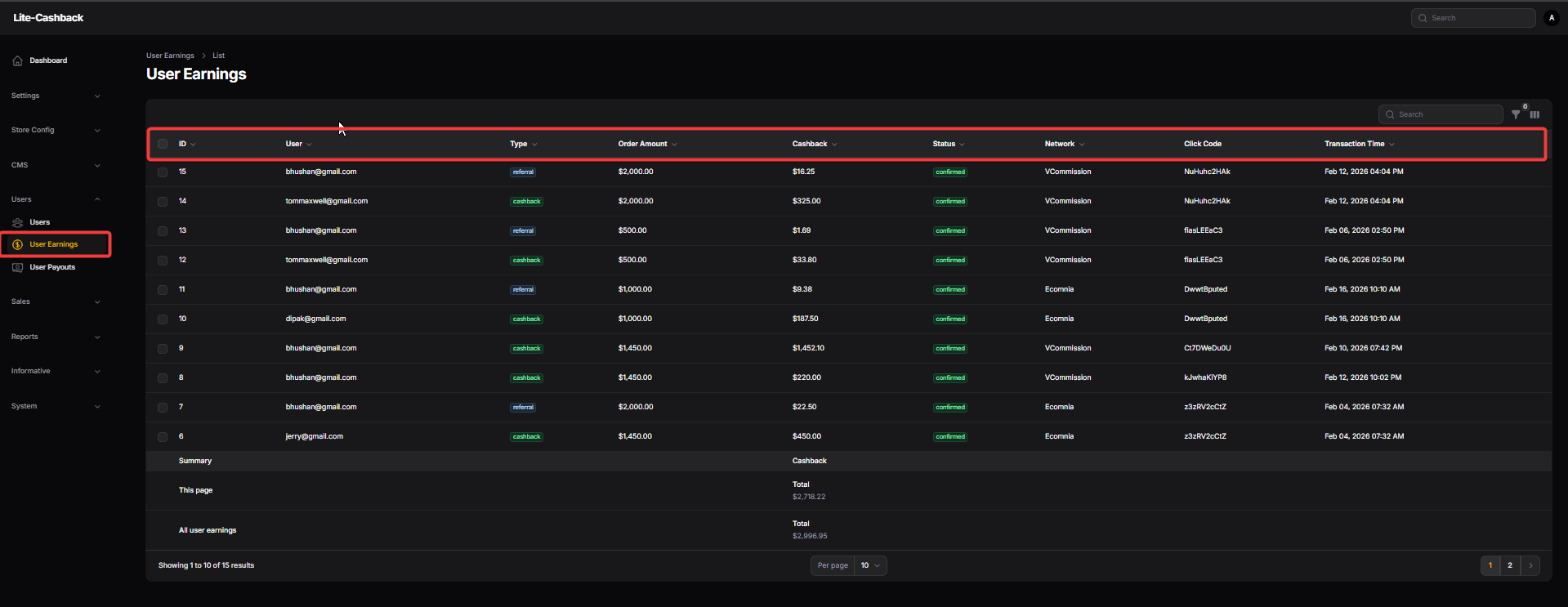
ID: A unique numerical identifier assigned to every earning entry in the system. It helps administrators track and reference specific records during support or auditing.
User: Displays the registered email address of the customer who performed the transaction. This allows admins to quickly identify which user is credited with the specific cashback amount.
Type: Indicates the category of the earning, such as "cashback" or "bonus." It helps distinguish between standard shopping rewards and other promotional credits.
Order Amount: The total purchase value made by the user on the merchant's site in their local currency. This serves as the base figure used to calculate the eligible cashback reward.
Cashback: The specific amount of money earned by the user from that particular transaction. This value represents the actual funds that will be added to the user’s wallet balance.
Status: Shows the current stage of the earning, such as "confirmed," "pending," or "rejected." It informs both the admin and the user whether the funds are ready for withdrawal.
Network: Identifies the third-party affiliate network (e.g., VCommission, Ecomnia) that tracked the sale. This is essential for reconciling data between your platform and the affiliate partners.
Click Code: A unique tracking string generated when the user clicked the "Shop Now" button. It serves as the digital paper trail to prove the lead originated from your platform.
Transaction Time: The exact date and timestamp when the earning was recorded in the system. This provides a chronological log to help resolve any timing-related user queries.
USER PAYOUT
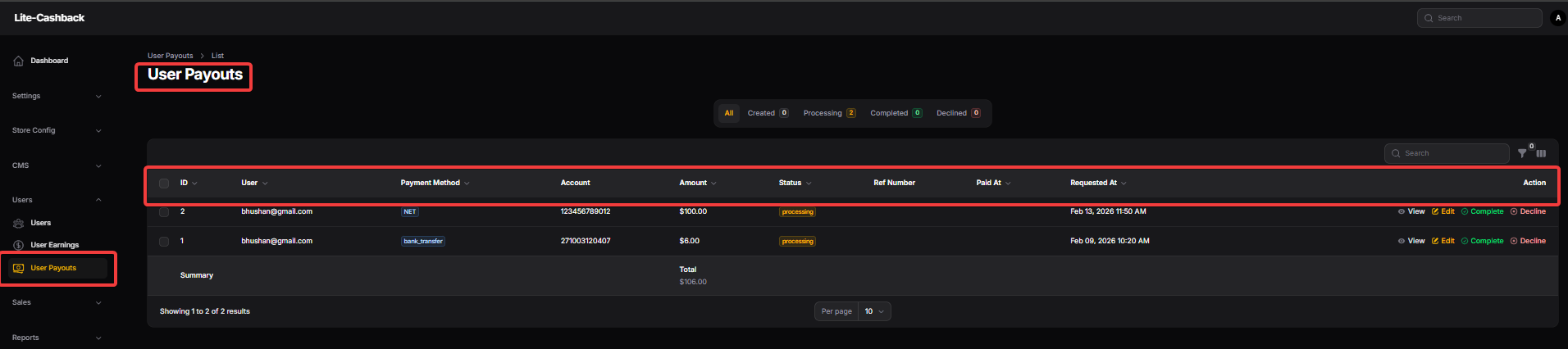
ID: A unique system-generated identifier assigned to each individual payout request. This helps administrators quickly locate and reference specific transactions for support or auditing purposes.
User: Displays the registered email address of the user who has requested the payout. This allows the admin to verify the identity of the account holder before processing funds.
Payment Method: Indicates the specific channel the user has selected to receive their funds, such as Bank Transfer or PayPal. This dictates the administrative steps required to fulfill the transaction.
Account: Shows the sensitive financial details provided by the user, such as a bank account number or email ID, where the funds should be sent. This information must be handled with high security and verified against the chosen payment method.
Amount: The total monetary value that the user is requesting to withdraw from their earned balance. Administrators use this figure to ensure the user has sufficient "Confirmed" funds available.
Status: Represents the current stage of the payout lifecycle, such as "processing," "completed," or "declined." It provides a clear visual indicator of which requests still require administrative action.
Ref Number: A field to input the transaction or reference ID provided by the bank or payment gateway after a successful transfer. This serves as official proof of payment for the user and the platform records.
Paid At: The timestamp recording exactly when the payout was successfully completed by the admin. This is useful for tracking processing speeds and resolving user queries about payment delays.
Requested At: Logs the date and time when the user first submitted their withdrawal request. This helps administrators manage requests on a first-come, first-served basis.
Action: A set of administrative controls that allow you to view details, edit information, or finalize the request as "Complete" or "Decline." These buttons are the primary tools for moving a payout through its final stages.