
NETWORKS

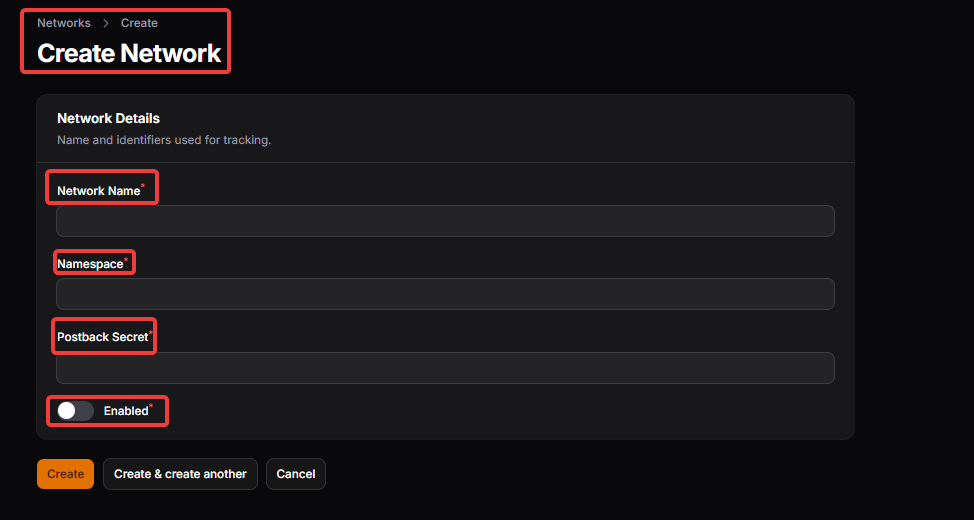
Network Name: This identifies the affiliate network inside the system. It is used for internal reference and display purposes in listings and reports.
Namespace: Defines the backend reference used for system-level integration and mapping with the respective network handler.
Postback Secret: Add a unique postback secret using symbols, letters etc.
-
Enabled: Controls whether the affiliate network is active and usable within the system.
STORE CATEGORIES:
Store categories are essential for organizing the various stores on your platform. Proper categorization enhances user navigation and improves the overall shopping experience. Categories can be broadly classified into parent and child categories, allowing for a hierarchical structure.

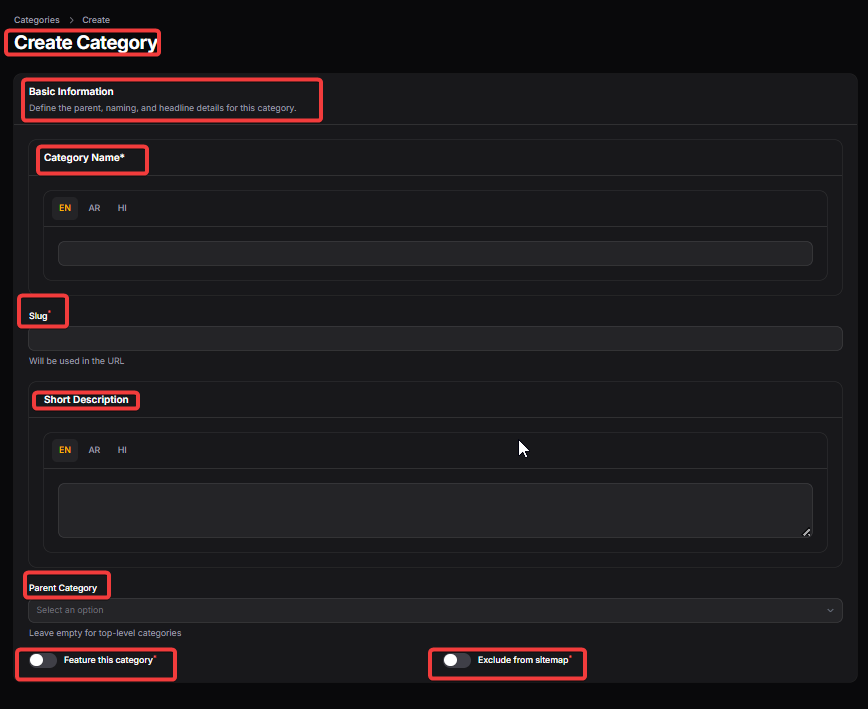
Name: Name is the store’s category official display name used across the website, including store listings, store pages, coupons and search results so users can easily recognize the brand.
Slug: Slug is the URL version of the store name and is used to create the store’s page link. It helps in SEO and allows users to access the store page directly.
Short Description : Provide a short description for the store category so the users would get described about the store category on site.
Parent Category: This defines whether the category is a main category or a sub-category under another category.
Feature this Category: The category which will be marked here will be shown as featured in frontend.
Exclude from Sitemap: Once this is marked the store category will be excluded from sitemap.
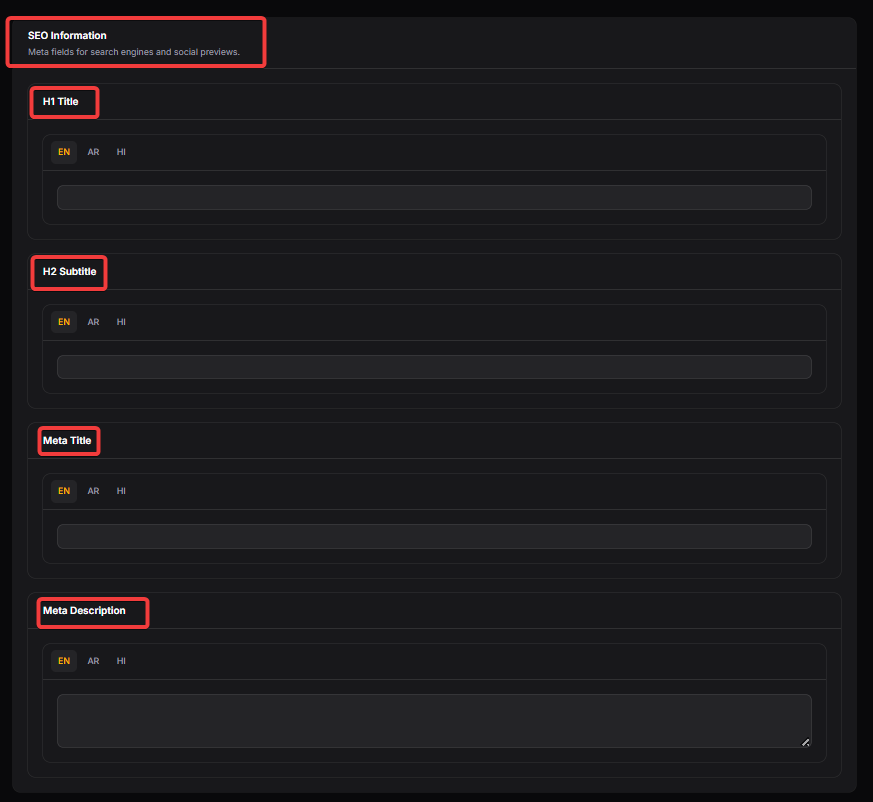
H1 Title : H1 is the main heading of the store page and is mainly used for SEO and as the primary title visible on the store detail page.
H2 Subtitle : H2 is the secondary heading used to support the main heading and improve content structure and SEO on the store page.
Meta Title: Meta Title is the title shown in the browser tab and search engine results, used to improve SEO and attract clicks from search listings.
Meta Description : Meta Description is the short summary used by search engines in search result snippets. It helps improve click-through rate and SEO but is not directly visible on the store page.
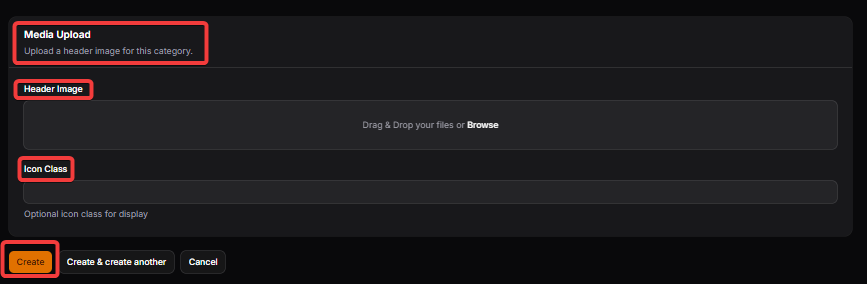
Header Image: Header Image is the banner image shown at the top of the category page. It is mainly used for design and branding to make the category page more attractive and visually distinct.
Icon Class: Icon is the small image used to visually represent the category in category menus, filters, and homepage category sections. It helps users quickly recognize the type of stores included in the category.
STORES
This section is used to manage all cashback stores, including adding or updating stores, configuring cashback rates, and enabling or disabling offers. It also helps track store performance using metrics like clicks and ratings. Bulk edit and CSV import features make it easy to manage a large number of stores efficiently.

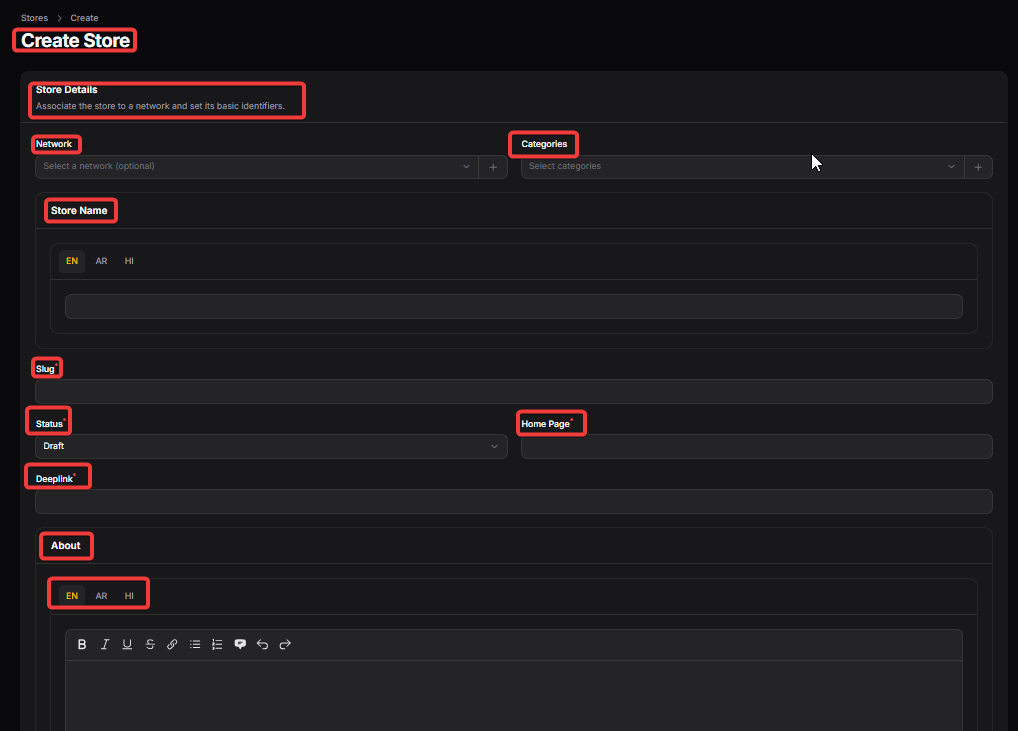
Network: Displays the affiliate network the store belongs to, helping identify partnerships and performance.
Categories : Cats (Categories) are used to group the store under relevant store categories like Fashion, Electronics, Travel, etc. This helps users find stores easily through category filters and improves site navigation.
Store Name: Name is the store’s official display name used across the website, including store listings, store pages, coupons, deals, and search results so users can easily recognize the brand.
Slug: Slug is the URL version of the store name and is used to create the store’s page link. It helps in SEO and allows users to access the store page directly.
Status : Status controls the overall visibility and availability of the store. When set to Publish, the store is live on the website. Draft keeps it hidden from users but saved in admin, and Trash removes it from active use while keeping the data for records.
Homepage : Homepage is the main website URL of the store. It is used to show the official site link on the store page and may also be used when users click on store name or visit the brand directly without tracking.
Deep link: Deep link is the affiliate tracking link that redirects users to the store while tracking their purchases for cashback. This link is used when users click on “Shop Now” or any cashback-related button.
-
About: About is the descriptive content of the store that explains what the brand offers and any important details for users. It is displayed on the store detail page and also helps with SEO.
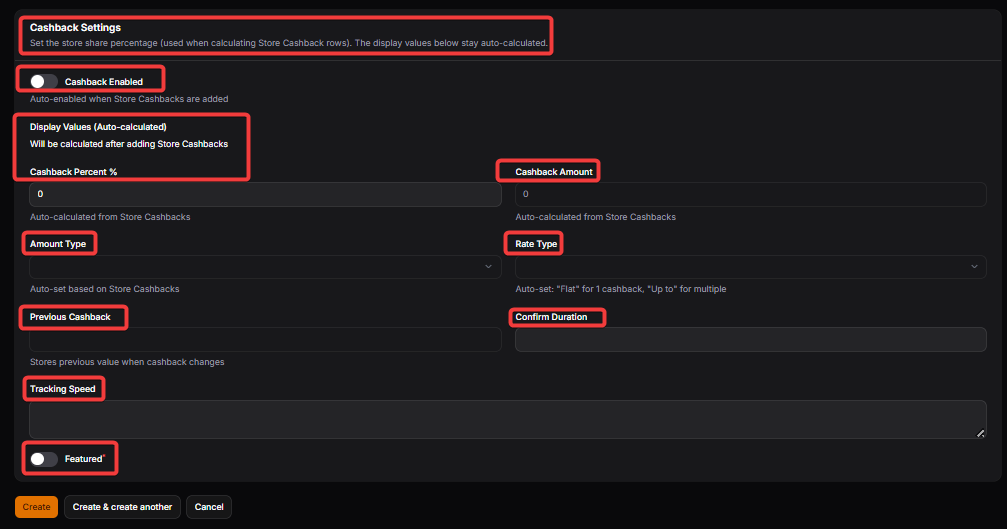
Cashback Enabled: Indicates if cashback is active for a store (Yes = Cashback available).
Cashback Percent: Shows the percentage of cashback users will receive for purchases made through the store.
Cashback Amount : Auto-calculated from Store Cashbacks.
Amount Type: Cashback Amount Type defines what kind of benefit the store provides, such as cashback, rewards, or points. This controls how the benefit is labeled and processed across the website and user wallet.
-
Rate Type (Fixed/Percent)
Functionality: Choose the rate type for the cashback from the dropdown list – either Fixed or Percent.
Fixed: If selected, the user receives a flat cashback amount. For example, if the commission is $8 and marked as "Fixed," the user gets this exact amount.
Percent: If selected, the user receives a percentage of the commission. For example, if the merchant commission is 10% and the cashback percent defined is 80%, the user will see and receive 8% cashback.
Previous Cashback: It is stores previous value when cashback changes
Confirm Duration: Confirm Duration is the expected time taken by the store or affiliate network to confirm the cashback after tracking. After this period, the cashback usually moves from pending to confirmed status if no issues are found.
Tracking Speed: Tracking Speed is the estimated time shown to users for how quickly their purchase will appear as tracked in their account. It helps set correct expectations and reduces support queries related to missing cashback.
Featured: Store can be featured as well and shown as featured store in frontend.
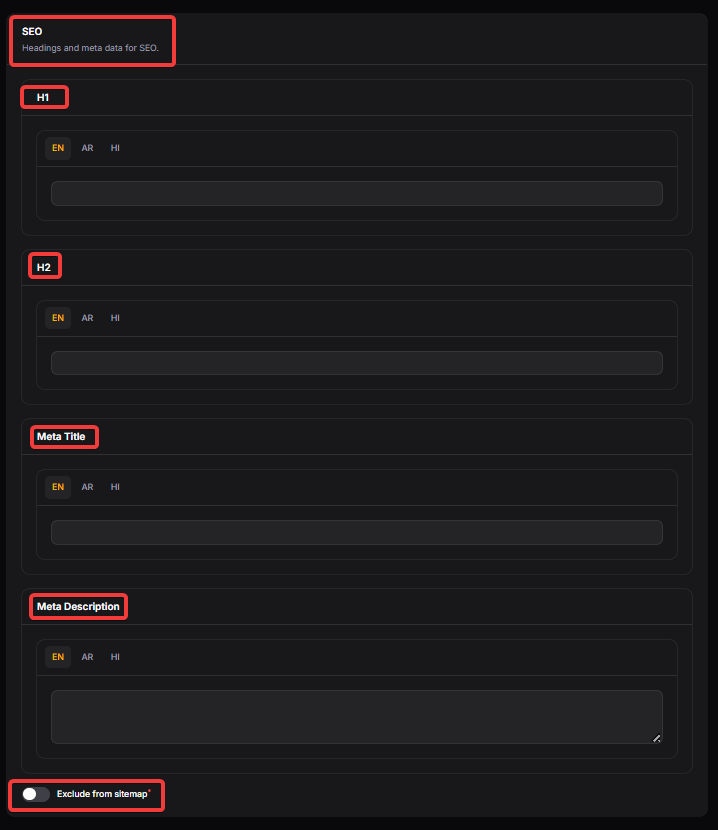
H1: H1 is the main heading of the store page and is mainly used for SEO and as the primary title visible on the store detail page.
H2: H2 is the secondary heading used to support the main heading and improve content structure and SEO on the store page.
META TITLE: Meta Title is the title shown in the browser tab and search engine results, used to improve SEO and attract clicks from search listings.
META DESCRIPTION: Meta Description is the short summary used by search engines in search result snippets. It helps improve click-through rate and SEO but is not directly visible on the store page.
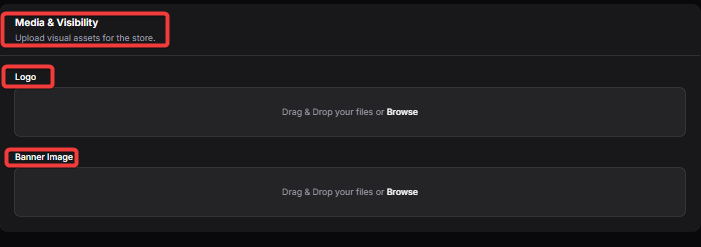
LOGO : Logo is the brand image of the store and is shown on store cards, store pages, and offer sections to improve brand visibility and user trust.
BANNER IMAGE: The Banner Image serves as the primary visual header for a merchant’s dedicated store page.
STORE CASHBACK:

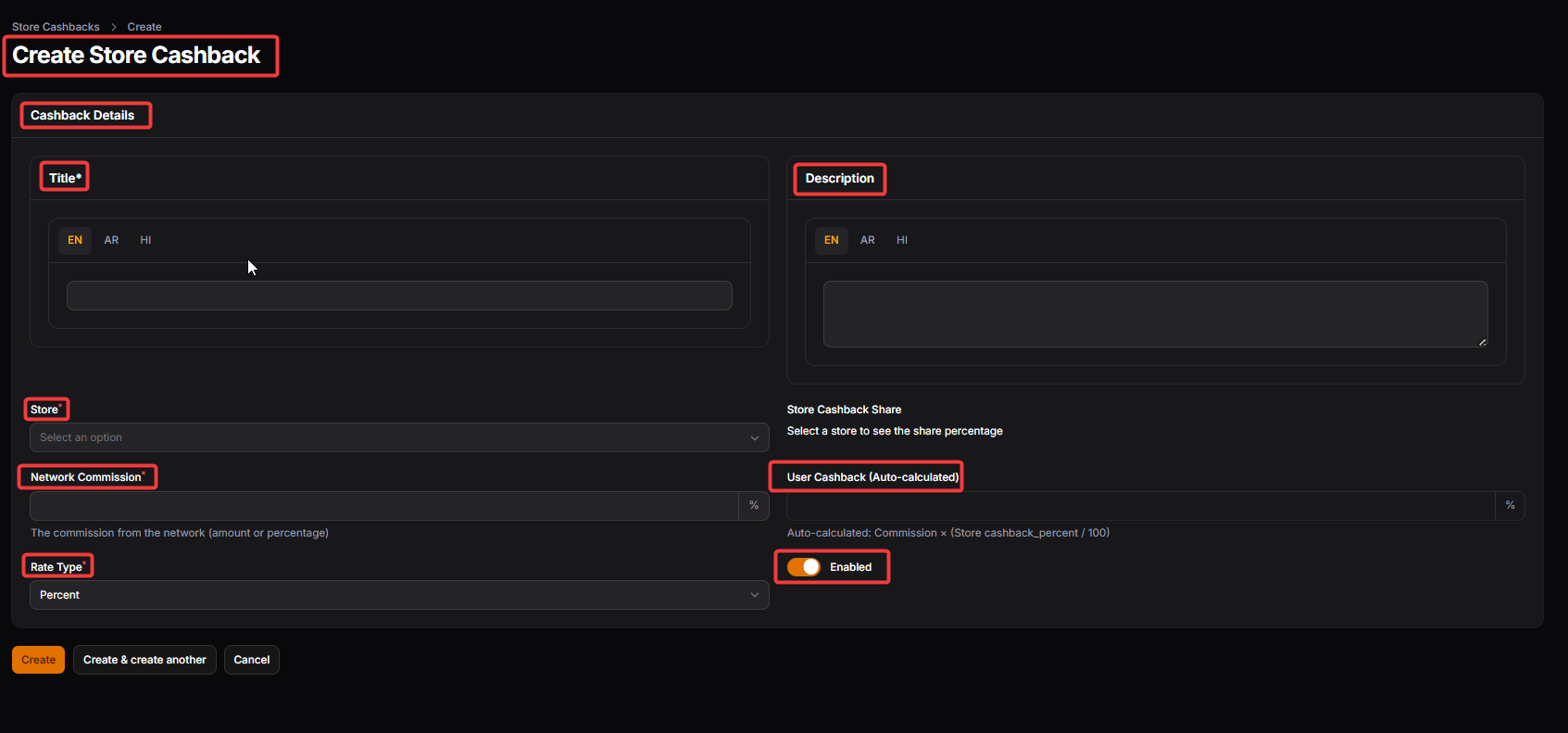
This section is used to define different cashback or commission slabs for the store based on conditions like sale type or category. Multiple rows can be added to create different cashback rules, and the system applies these while calculating user cashback.
-
Title
Functionality: Enter the title of the cashback category, such as "New User Bonus".
Purpose: The title should clearly indicate the nature of the cashback offer or category.
Importance: A descriptive title helps users understand the specific cashback offer at a glance.
-
Description
Functionality: Provide a detailed description of the cashback category or offer.
Purpose: This can include additional information about the offer, such as eligibility criteria or terms of use.
Importance: A comprehensive description aids in setting the right expectations and clarifies the offer's details.
Store : Select a store for which store cashback is need to be created.
-
Network Commission
Functionality: Enter the commission percentage received from the affiliate network.
Example: If the commission is 10% and the cashback percentage is set to 80%, the actual cashback percentage provided to the user will be 8%.
Importance: Accurate commission entry is crucial for correct cashback calculation and maintaining financial integrity.
-
Rate Type (Fixed/Percent)
Functionality: Choose the rate type for the cashback from the dropdown list – either Fixed or Percent.
Fixed: If selected, the user receives a flat cashback amount. For example, if the commission is $8 and marked as "Fixed," the user gets this exact amount.
Percent: If selected, the user receives a percentage of the commission. For example, if the merchant commission is 10% and the cashback percent defined is 80%, the user will see and receive 8% cashback.
Importance: Selecting the correct rate type ensures accurate calculation and display of cashback to users.
User Cashback (Auto-calculated): Auto-calculated: Commission × (Store cashback_percent / 100).
-
Enabled
Functionality: Toggle to enable or disable the display of this cashback category on the front end.
Purpose: This allows you to control which cashback offers are currently active and visible to users.
COUPONS:
This section allows you to manage and display various coupons received from affiliate networks for specific stores. Proper configuration ensures that these offers are effectively showcased to users, enhancing their shopping experience and potentially increasing conversions.
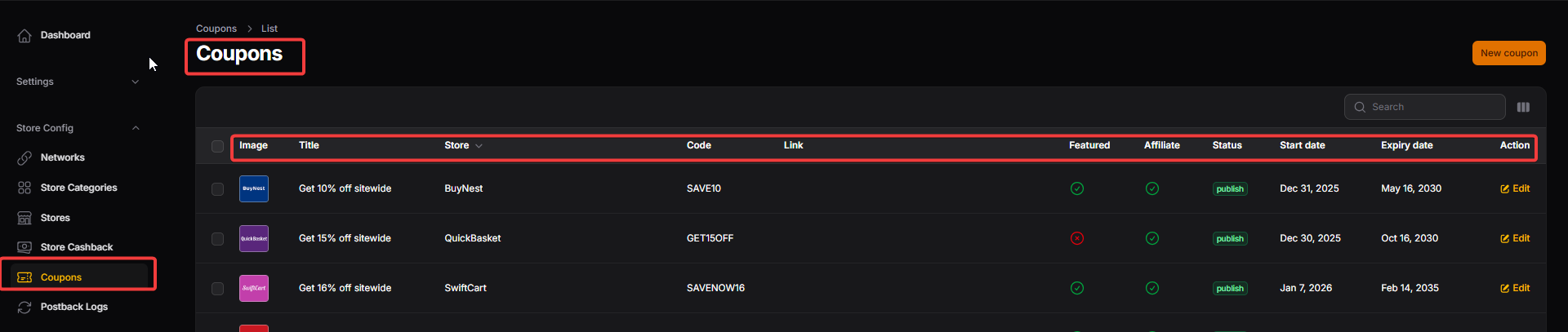
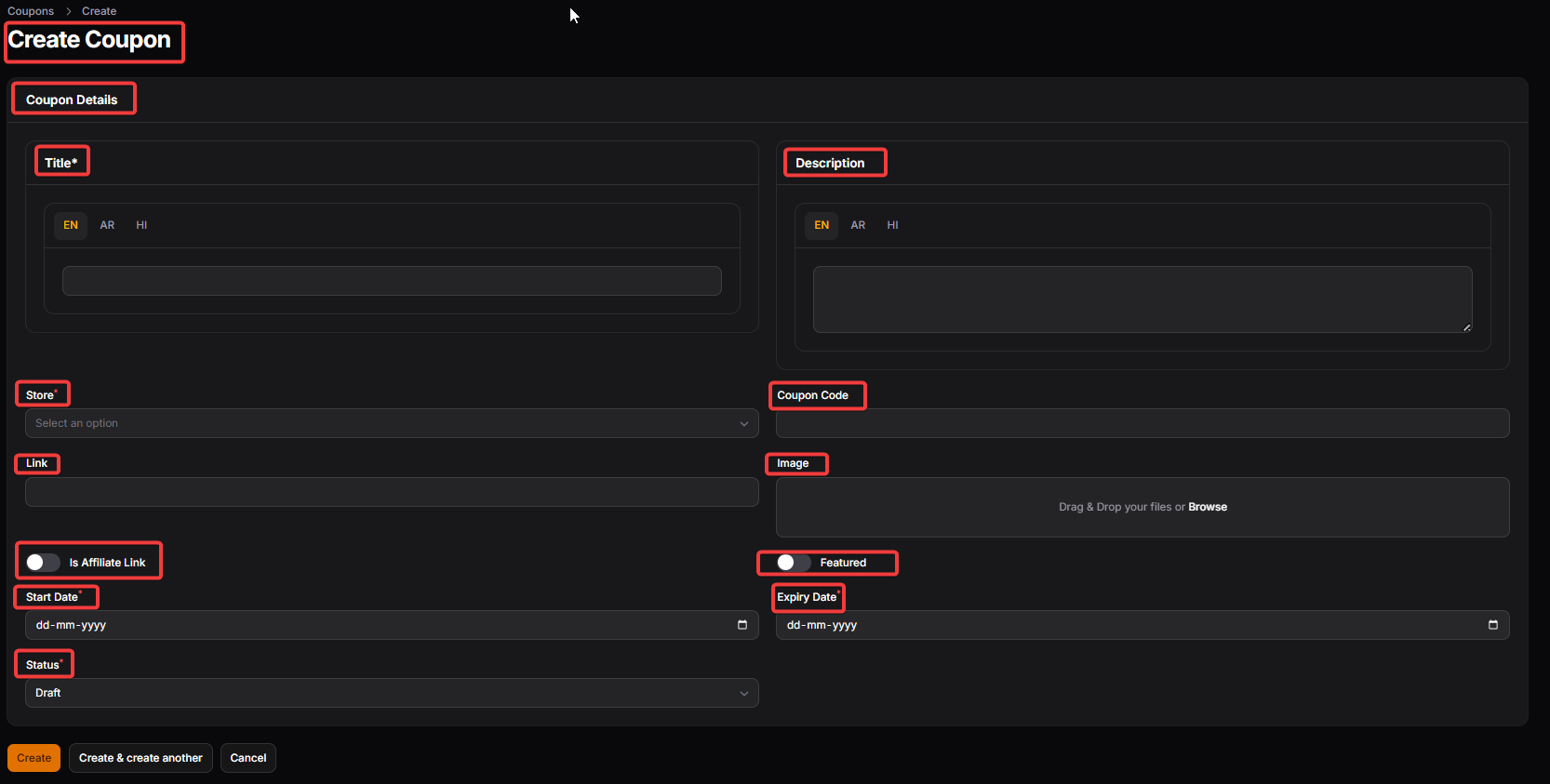
Title: Title is the main headline of the offer that users see on offer cards and store pages. It should clearly describe the benefit, such as discount amount or deal type, to attract user attention.
Store: Store shows which store or merchant the offer belongs to.
Coupon code: Link is the URL where users are redirected when they click the offer.
Link : Link is the URL where users are redirected when they click the offer.
Is Affiliate Link: Is Affiliate Link indicates whether the offer link is an affiliate tracking link. When enabled, the system treats the link as trackable for cashback and reporting purposes.
Start Date : Start Date defines when the offer becomes active and visible to users. Before this date, the offer will not appear on the frontend.
Expiry Date : Expiry Date defines when the offer should automatically stop showing on the website. After this date, the offer is treated as expired.
POSTBACK LOGS:
Postback Log records all transaction updates received from affiliate networks through server-to-server (S2S) tracking. It stores detailed information about each sale, commission, and status update sent by the network. This section is essential for validating conversions, tracking commission changes (approved, pending, declined), resolving disputes, and ensuring accurate cashback and revenue calculations within the system.
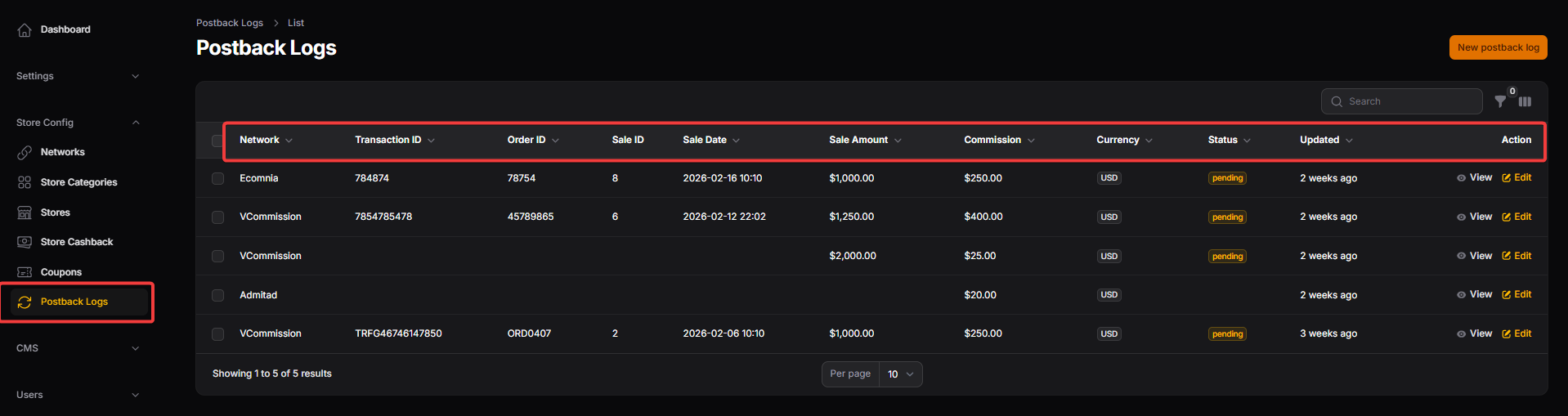
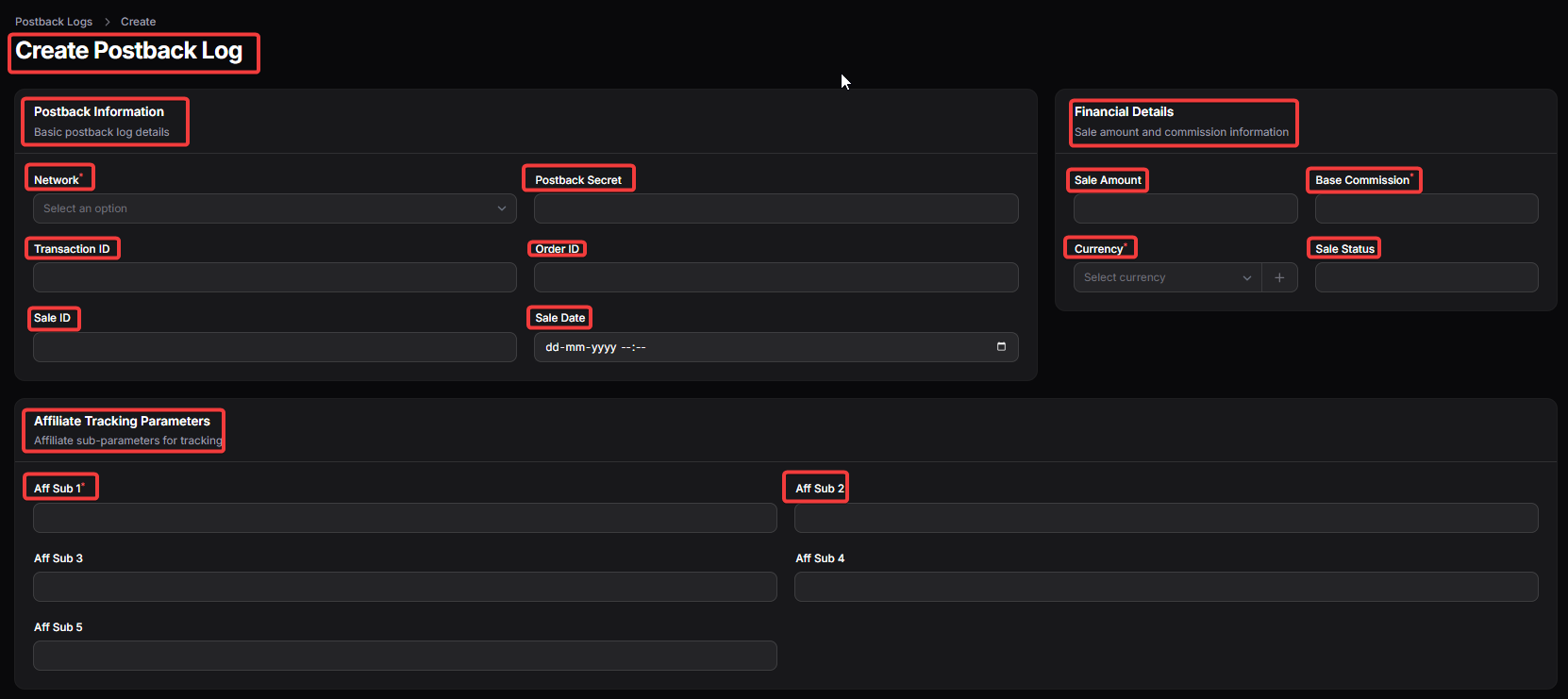
NETWORK: Identifies the affiliate network that sent the transaction update, ensuring proper source tracking
TRANSACTION ID: A unique identifier provided by the network for the tracked conversion, used to avoid duplication and ensure accurate updates.
ORDER ID: Refers to the merchant’s order reference number, allowing cross-verification with store data if required.
SALE ID: Internal reference ID generated by the system for managing the transaction record
SALE DATE: Indicates the date when the transaction occurred, helping in reporting and reconciliation.
SALE AMOUNT: Displays the total value of the transaction on which commission is calculated.
BASE COMMISSION: Shows the commission amount received from the network before any internal adjustments or cashback deductions.
CURRENCY: Specifies the currency in which the transaction and commission are recorded to maintain financial accuracy.
SALE STATUS: Shows the current status of the transaction (such as pending, approved, or declined), directly affecting cashback processing.
-
AFF SUB1 - AFF SUB5: Custom tracking parameters used for passing additional identifiers (such as user ID, click ID, or source data) for advanced tracking and attribution.